
Some web projects land $15K clients; others teach nothing except what NOT to build. The difference? Projects that solve real problems vs "tutorial projects" everyone else builds.
Great portfolio projects aren't just technically impressive. They demonstrate business value, solve actual user needs, and show you can ship complete products. A well-chosen project is worth 10 tutorial completions when you're pitching clients or applying for jobs.
This guide gives you 20 project ideas across skill levels, explains what each teaches you, and shows how to present them to actually land work. No more "todo apps" that look like everyone else's.
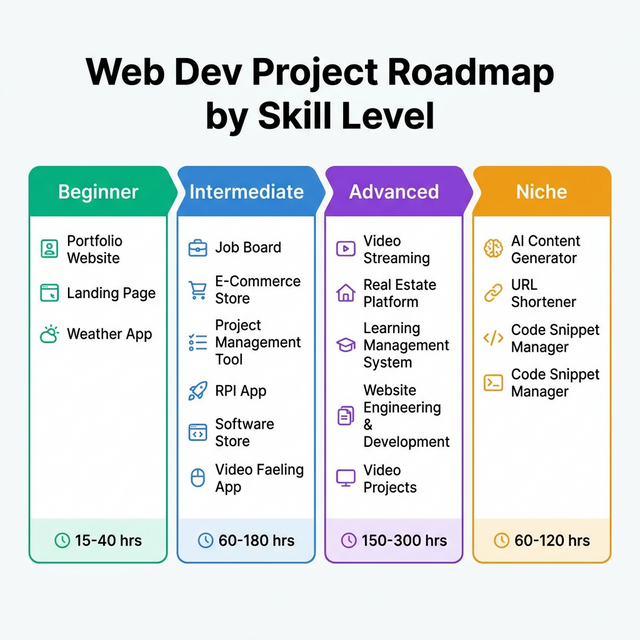
Quick Answer: What Makes a Great Portfolio Project
Essential qualities:
- Solves a real problem — Not just "demonstrates React"
- Looks professional — Design matters even for backend devs
- Shows business understanding — Proves you get "why" not just "how"
- Has unique features — Differentiates from tutorial clones
- Actually works — No broken demos or "coming soon" features
What doesn't impress:
- Exact tutorial replicas
- Todo apps (unless uniquely innovative)
- Clone sites (build something original)
- Broken links or features
- No live demo
Beginner Projects
1. Personal Portfolio Website
A professional portfolio showcasing your work, skills, and contact information.
Key Features
- About Me section with bio and photo
- Projects gallery with thumbnails
- Skills section with tech stack icons
- Contact form with email integration
- Dark mode toggle
- Smooth scroll navigation
Tech Stack
What You'll Learn
- Responsive design fundamentals
- CSS Grid and Flexbox layouts
- Form handling and validation
- Git and deployment workflow
- Basic SEO (meta tags, semantic HTML)
How to Make It Stand Out
Estimated time: 15-30 hours
2. Landing Page for a Local Business
A conversion-optimized landing page for a real or fictional local business (restaurant, gym, hair salon, etc.).
Key Features
- Hero section with clear value proposition
- Services/menu section with pricing
- Testimonials or reviews section
- Location map integration (Google Maps)
- Call-to-action buttons (Book Now, Call Us)
- Mobile-first responsive design
- Contact form
Tech Stack
What You'll Learn
- Conversion-focused design
- Working with third-party APIs (Maps)
- Content hierarchy and layout
- Call-to-action optimization
- Local business SEO basics
How to Make It Stand Out
Estimated time: 20-35 hours
3. Weather Dashboard App
A weather app that shows current conditions, forecasts, and additional data for any location.
Key Features
- Search by city name or zip code
- Current weather display (temp, humidity, wind)
- 5-day forecast
- Hourly forecast (next 24 hours)
- Save favorite locations
- Geolocation detection
- Background changes based on weather
Tech Stack
What You'll Learn
- Working with REST APIs
- Async JavaScript (fetch, promises, async/await)
- State management
- LocalStorage for data persistence
- Error handling (API failures, invalid locations)
How to Make It Stand Out
Estimated time: 25-40 hours
4. Recipe Finder App
An app that lets users search for recipes, filter by dietary restrictions, and save favorites.
Key Features
- Search recipes by ingredients or name
- Filter by diet (vegetarian, vegan, gluten-free)
- Recipe cards with image, title, cooking time
- Detailed recipe view (ingredients, instructions)
- Save favorite recipes
- Shopping list generator
- Print-friendly recipe view
Tech Stack
What You'll Learn
- Component-based architecture
- API integration with complex data
- Filtering and search functionality
- State management (Context API or Redux)
- CRUD operations
How to Make It Stand Out
Estimated time: 35-50 hours
5. Expense Tracker
A personal finance app to track income, expenses, and budgets with visual reports.
Key Features
- Add income and expense entries
- Categorize transactions
- Date range filtering
- Budget setting per category
- Data visualization (pie charts, bar graphs)
- Export data to CSV
- Transaction history with search
Tech Stack
What You'll Learn
- Data manipulation and calculations
- Date handling (JavaScript Date object)
- Data visualization libraries
- LocalStorage/IndexedDB
- CSV export functionality
How to Make It Stand Out
Estimated time: 40-60 hours
Intermediate Projects
6. Job Board Platform
A job listing website where companies post jobs and candidates can apply.
Key Features
- Job listings with filters (location, type, salary)
- Job detail pages with full descriptions
- Company profiles with posted jobs
- Application form for candidates
- Search by title, skills, location
- Bookmark/save jobs feature
- Admin dashboard for managing listings
Tech Stack
What You'll Learn
- Full-stack development
- User authentication and authorization
- Database schema design
- File upload handling
- Email integration
- Search and filtering algorithms
How to Make It Stand Out
Estimated time: 60-100 hours
7. E-Commerce Store
A fully functional online store with products, cart, checkout, and order management.
Key Features
- Product catalog with categories
- Product detail pages with variants
- Shopping cart with quantity adjustment
- Checkout with shipping/billing forms
- Payment integration (Stripe or PayPal)
- User accounts with order history
- Admin panel for product/order management
Tech Stack
What You'll Learn
- Payment processing integration
- Shopping cart logic and state
- Order workflow management
- Security best practices (payments)
- Email automation
- Product data modeling
How to Make It Stand Out
Estimated time: 100-150 hours
8. Project Management Tool
A Trello/Asana-like tool for managing tasks, projects, and team collaboration.
Key Features
- Kanban board with drag-and-drop
- Task cards with descriptions, due dates, labels
- Multiple boards/projects
- Team member assignments
- Comments and activity feed
- File attachments
- Search and filter tasks
- Calendar view
Tech Stack
What You'll Learn
- Drag-and-drop interfaces
- Real-time collaboration features
- Complex data relationships
- Role-based permissions
- WebSocket communication
- Notification systems
How to Make It Stand Out
Estimated time: 120-180 hours
9. Fitness Tracking App
An app to log workouts, track progress, and view fitness analytics.
Key Features
- Workout logging (exercises, sets, reps, weight)
- Exercise library with instructions
- Custom workout creation & templates
- Progress photos with before/after
- Body measurements tracking
- Analytics and charts over time
- Personal records tracking
Tech Stack
What You'll Learn
- Mobile app development (React Native)
- Health/fitness data modeling
- Progress tracking algorithms
- Image upload and optimization
- Chart / graph creation
- Social features implementation
How to Make It Stand Out
Estimated time: 100-150 hours
10. Social Media Dashboard
A unified dashboard to view and manage multiple social media accounts.
Key Features
- Connect multiple social accounts
- Unified feed from all platforms
- Post scheduling across platforms
- Analytics dashboard (followers, engagement)
- Content calendar view
- Hashtag suggestions
- Best time to post recommendations
Tech Stack
What You'll Learn
- OAuth authentication flow
- Working with multiple third-party APIs
- Data aggregation from multiple sources
- Task scheduling (cron jobs)
- Complex state management
- Real-time data updates
How to Make It Stand Out
Estimated time: 80-120 hours
Advanced Projects
11. Video Streaming Platform
A YouTube/Netflix-like platform for uploading, streaming, and discovering videos.
Key Features
- Video upload with transcoding
- Video player with quality selection
- Channel/creator pages
- Subscribe, comments, likes
- Recommendations based on watch history
- Watch later and playlists
- Video analytics for creators
- Trending page algorithm
Tech Stack
What You'll Learn
- Video processing and transcoding
- CDN and content delivery
- Recommendation algorithms
- Large-scale data handling
- Search engine optimization
- Real-time streaming (WebRTC)
- Caching strategies
How to Make It Stand Out
Estimated time: 200-300 hours
12. Real Estate Listing Platform
A Zillow-like platform for browsing, searching, and managing property listings.
Key Features
- Property listings with photos, details, pricing
- Advanced search and filters
- Interactive map view
- Mortgage calculator
- Save favorite properties
- Schedule viewings
- Neighborhood info (schools, crime, amenities)
- Price history and market trends
Tech Stack
What You'll Learn
- Geospatial data and queries
- Complex filtering systems
- Map integration and markers
- Image gallery optimization
- Lead capture and management
- Market data visualization
How to Make It Stand Out
Estimated time: 150-250 hours
13. Learning Management System (LMS)
An online course platform where instructors create courses and students learn.
Key Features
- Course creation tools for instructors
- Video lessons with playback tracking
- Quizzes and assignments
- Student progress tracking
- Discussion forums per course
- Certificate generation on completion
- Course ratings and reviews
- Payment integration for paid courses
Tech Stack
What You'll Learn
- Content delivery systems
- Progress tracking algorithms
- Video hosting optimization
- Quiz/assessment logic
- Certificate generation
- Subscription management
How to Make It Stand Out
Estimated time: 200-300 hours
14. Booking / Reservation System
An appointment booking platform for businesses like salons, doctors, consultants.
Key Features
- Service provider profiles
- Service catalog with durations & pricing
- Calendar availability management
- Online booking by customers
- Email/SMS confirmations & reminders
- Payment processing
- Cancellation & rescheduling
- Staff management
Tech Stack
What You'll Learn
- Calendar and scheduling algorithms
- Time zone handling
- Conflict detection and prevention
- Reminder systems
- Multi-tenant architecture
- Email/SMS automation
How to Make It Stand Out
Estimated time: 150-200 hours
15. Cryptocurrency Portfolio Tracker
Track crypto holdings, view real-time prices, and analyze portfolio performance.
Key Features
- Add holdings (coin, quantity, purchase price)
- Real-time price updates
- Portfolio value & profit/loss tracking
- Price alerts
- Historical price charts
- Multiple portfolio support
- Tax reporting (capital gains/losses)
Tech Stack
What You'll Learn
- Real-time data updates (WebSockets)
- Financial calculations
- Data visualization (price charts)
- Alert/notification systems
- API rate limiting strategies
- Tax calculation logic
How to Make It Stand Out
Estimated time: 100-150 hours
Specialized / Niche Projects
16. AI Content Generator
A tool using AI to generate blog posts, social captions, product descriptions, and more.
Key Features
- Content type selection (blog, social, ad copy)
- Input fields for topic, tone, length
- AI-generated content output
- Edit and refine generated content
- Templates for different use cases
- Tone options (professional, casual, funny)
- Usage tracking (credits/limits)
Tech Stack
What You'll Learn
- AI API integration
- Prompt engineering
- Credit/usage tracking systems
- Payment for consumption-based service
- Content formatting and export
How to Make It Stand Out
Estimated time: 80-120 hours
17. URL Shortener with Analytics
A Bitly-like service to shorten URLs and track clicks with detailed analytics.
Key Features
- URL shortening with custom aliases
- QR code generation
- Click tracking (location, device, referrer)
- Link expiration dates
- Password-protected links
- Link management dashboard
- Analytics with charts
- API for programmatic access
Tech Stack
What You'll Learn
- URL validation and parsing
- Hash generation algorithms
- Analytics tracking implementation
- Rate limiting
- API development
- QR code generation
- Caching strategies
How to Make It Stand Out
Estimated time: 60-90 hours
18. Code Snippet Manager
Save, organize, and search code snippets with syntax highlighting.
Key Features
- Save snippets with title, language, tags
- Syntax highlighting for 50+ languages
- Search by language, tags, or keyword
- Organize into collections/folders
- Share snippets via link
- Copy to clipboard button
- Import from GitHub Gists
- Snippet versioning
Tech Stack
What You'll Learn
- Code syntax highlighting
- Search functionality implementation
- File import/export
- Version control basics
- Clipboard API
How to Make It Stand Out
Estimated time: 70-100 hours
19. Habit Tracker
Build and track daily habits with streaks and insights.
Key Features
- Create custom habits with frequency
- Check off completed habits daily
- Streak tracking (current, longest)
- Calendar heatmap (GitHub-style)
- Habit reminders/notifications
- Habit categories/tags
- Weekly/monthly reports
- Habit completion percentage
Tech Stack
What You'll Learn
- Recurring event logic
- Streak calculation algorithms
- Calendar/heatmap visualization
- Push notifications
- Progress tracking
- Data visualization
How to Make It Stand Out
Estimated time: 80-120 hours
20. Markdown Blog Platform
A blogging platform where content is written in Markdown with live preview.
Key Features
- Markdown editor with live preview
- Syntax highlighting for code blocks
- Image upload and embedding
- Draft/publish workflow
- Post categories and tags
- Comment system
- Reading time estimate
- RSS feed
- Search functionality
Tech Stack
What You'll Learn
- Markdown parsing and rendering
- Static site generation
- SEO optimization
- Comment system implementation
- RSS feed generation
- Full-text search
How to Make It Stand Out
Estimated time: 90-130 hours
How to Choose Your Next Project
Building a Portfolio
- Choose 3-5 diverse projects
- At least one full-stack
- At least one with complex UI
- At least one solving a real problem
Learning New Tech
- Pick a project that requires that tech
- Want TypeScript? Build the Job Board
- Want WebSockets? Build a Chat App
- Want AI? Build the Content Generator
Landing Clients
- Build in your target industry
- Want e-commerce clients? Build a store
- Want SaaS work? Build a dashboard
- Write a case study for each project
Project Complexity Guide (by Available Time)
| Timeframe | Hours | Good Projects |
|---|---|---|
| Weekend | 10-20 hours | Portfolio, Weather App, Landing Page |
| One month | 40-80 hours | Recipe Finder, Expense Tracker, URL Shortener, Habit Tracker |
| Two months | 80-150 hours | Job Board, E-Commerce Store, Booking System, Fitness Tracker |
| Three+ months | 150+ hours | Video Streaming, LMS, Real Estate Platform |
How to Present Projects to Clients
For each project in your portfolio, include these sections to maximize impact:
Portfolio Entry Template
- Project Overview — What it does, problem it solves, target user
- Tech Stack — Frontend, backend, notable libraries/APIs
- Key Features — 3-5 standout features, what makes it unique
- Screenshots / Demo — Live demo link (required), GitHub repo, video walkthrough
- Results / Impact — Users signed up, performance metrics, client feedback
Case Study Format
PROJECT NAME

THE CHALLENGE
[Business problem or user need]

THE SOLUTION
[Your approach and key decisions]

THE TECH
[Stack and why you chose it]

THE RESULTS
[Metrics, feedback, or learnings]

LIVE DEMO: [link]
CODE: [GitHub link]
Tools & Resources
Design
- Figma (UI design)
- Coolors (color palettes)
- Hero Icons (icons)
- Unsplash (free images)
APIs for Projects
- OpenWeatherMap (weather)
- Spoonacular (recipes)
- CoinGecko (crypto prices)
- NewsAPI (news articles)
- Google Maps (locations)
Hosting
- Vercel (frontend, Next.js)
- Netlify (static sites)
- Railway (backend)
- PlanetScale (database)
- Cloudinary (images)
Start Building Your Portfolio Today
The best project is the one you actually finish. Pick one from this list that excites you, set a deadline, and ship it.
Action steps:
- Choose ONE project from your skill level
- Set a deadline (be realistic about hours available)
- Create a feature list (start with MVP, add extras later)
- Build in public (tweet progress, get feedback)
- Deploy early (even if not perfect)
- Write a case study (explain your process)
Stop planning. Start building. Your next project could land your next client.
Web Development Project Ideas FAQ
Related Tools & Resources
Web Developer Rates 2026
See what web developers charge hourly and per project.
Freelance Contract Template
Protect yourself with a proven freelance contract.
Web Developer Rates 2026
Complete pricing guide for freelance web developers.
How to Make Money Fast
12 realistic ways to build income quickly.
Hostinger vs Namecheap 2026
Which one is better for web developers? Speed tests and data.